

TEXONIC
TEXONIC PA380 380W 2-Zone Commercial Mixer Amplifier with Bluetooth & Paging
TEXONIC PA380 380W 2-Zone Commercial Mixer Amplifier with Bluetooth & Paging
SKU:
Couldn't load pickup availability
TEXONIC PA380 380W 2-Zone Mixer Amplifier
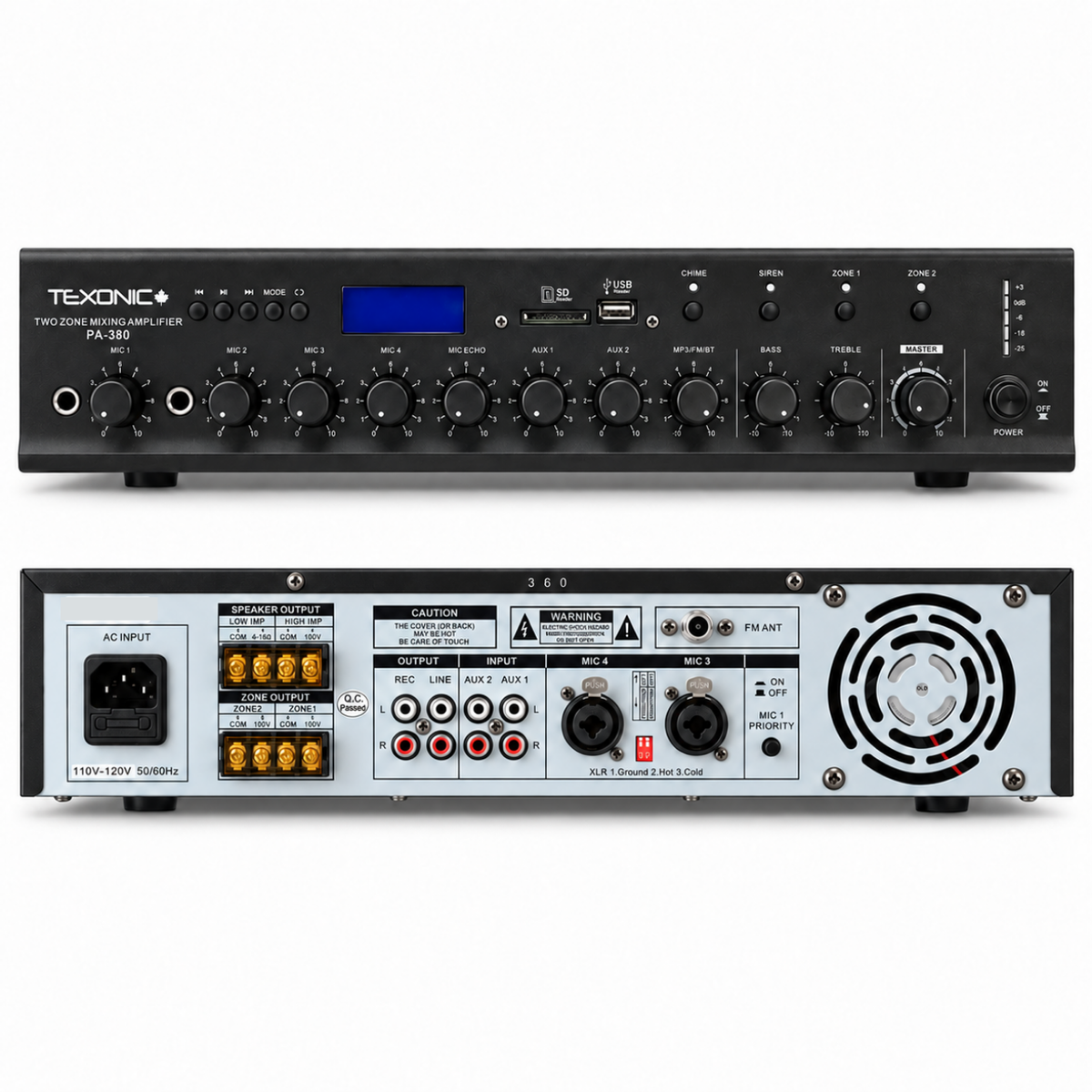
The TEXONIC PA380 brings together 380W of commercial amplifier power, built-in audio playback and microphone paging for two selectable speaker areas.
Designed for 100V distributed audio installations, the PA380 gives businesses a central location to operate background music and routine announcements throughout connected speaker circuits.
Bluetooth, FM, USB and SD playback provide convenient music choices. Four microphone channels, two auxiliary inputs and MIC1 voice priority control support announcements and additional external sources.
With independent speaker area selection, multiple input level controls and alternative low impedance speaker connections, the PA380 is a practical choice for commercial installations requiring flexible everyday operation.
Centralized Audio for Two Speaker Circuits
The PA380 is designed for facilities that need dependable music and microphone announcements from one central amplifier, with the ability to select which of two connected speaker areas receives audio.
For 100V installations, speakers can be arranged into two suitable circuits. Each zone is enabled using its front-panel selection switch, making it convenient to operate one area or both.
The amplifier's 380W output is shared across the speaker system. The required speaker quantity and transformer taps should be chosen according to the installation's coverage and power needs.
Useful Commercial Installations
Organize Music and Paging Sources
The integrated media player offers Bluetooth, FM, USB and SD operation. Compatible MP3 and WMA files can be used with supported removable media.
For a permanent business music source, AUX1 or AUX2 can be connected to suitable external equipment such as a dedicated music player or media streamer.
Individual controls for microphones, auxiliary sources and the media player allow audio input levels to be adjusted before setting the overall master volume.
Paging Priority from MIC1
The rear panel MIC1 priority switch provides an ON/OFF selection for voice-priority ducking.
When the feature is enabled, an announcement made using MIC1 can lower the level of background music so spoken messages remain more prominent.
This is useful for day-to-day announcements in facilities where music and paging share the same speaker system.
Professional Microphone Connections
MIC1 and MIC2 provide convenient front-panel ¼-inch connections. MIC3 and MIC4 are available through rear-panel combination XLR / ¼-inch inputs.
The amplifier includes a 48V phantom power switch for compatible microphones connected to the supported rear inputs.
External Audio Equipment
The REC and LINE connections provide additional ways to integrate the PA380 with compatible external equipment.
The LINE output can be connected to a suitable power amplifier or active subwoofer, subject to the equipment's line-level input requirements.
For general speaker compatibility, see the TEXONIC 70V vs. 8-Ohm Speaker Guide .
Key Features
- 380W rated commercial mixer amplifier
- Two selectable 100V speaker zones
- Front-panel Zone 1 and Zone 2 switches
- Alternative Direct 100V speaker connection
- Separate 4–16Ω low-impedance output
- Built-in Bluetooth audio playback
- FM radio receiver with antenna connection
- USB and SD media playback
- MP3 and WMA file format support
- Four microphone input channels
- Front-panel MIC1 and MIC2 ¼-inch inputs
- Rear-panel MIC3 and MIC4 XLR / ¼-inch combo inputs
- 48V phantom power switch for compatible microphones
- Selectable MIC1 voice-priority ducking
- Two external AUX inputs
- Individual MIC1–MIC4 level controls
- Separate AUX1 and AUX2 volume controls
- Individual media-player level control
- Microphone echo adjustment
- Front-panel chime function
- Front-panel siren function
- Bass and treble controls
- Master output volume adjustment
- Front-panel LCD media display
- LED audio output level meter
- REC audio output
- LINE output for external audio equipment
- AC 120V, 60Hz power requirement
Chime and Siren Functions
Dedicated front-panel switches provide access to the PA380's built-in chime and siren audio functions.
These functions offer additional audio options for suitable general-purpose paging and announcement applications.
Adjusting Speech Clarity
Use the microphone input volume controls to establish appropriate paging levels.
Bass and treble adjustments can help balance the overall system sound, while the microphone echo control can be adjusted for appropriate voice applications.
For routine paging, use echo sparingly to preserve speech intelligibility.
Media and Source Balance
The PA380 provides separate microphone, auxiliary and media player controls. These help balance connected sources so that switching between music and announcements does not create excessive volume differences.
Technical Specifications
How the Two Speaker Zones Work
The PA380 provides separate selection switches for two 100V speaker circuits.
These switches determine which connected areas receive the amplifier's music and paging programme.
Operating Choices
Need Different Listening Levels?
Compatible commercial 100V wall volume controls may be considered when each area requires local level adjustment.
The selected volume controls must be properly rated for the connected speakers, and the complete amplifier load must be considered.
Speaker Output Configurations
380W Power & 100V Speaker Load Planning
For distributed 100V audio, the combined speaker load is calculated by adding the selected transformer wattage taps of every connected speaker.
The PA380 is rated at 380W total output, shared across its speaker circuits.
A conservative starting point is to reserve 20% of amplifier power rather than design the system at its full rated output.
Example Two-Zone Installation
The following is an illustrative 100V speaker configuration using commercial speakers with 10W transformer taps.
| Speaker Circuit | Speakers | Tap Each | Load |
|---|---|---|---|
| Zone 1 | 10 | 10W | 100W |
| Zone 2 | 8 | 10W | 80W |
| Combined | 18 | 10W | 180W |
The combined 180W load leaves 200W of unused rated amplifier capacity.
This is a tap-loading calculation only. Confirm the permissible loading of each zone against the output requirements of the particular installation. The manual does not publish a separate per-zone wattage rating.
Additional 100V Loading Examples
| Speakers | 100V Tap | Combined Load | Capacity Remaining |
|---|---|---|---|
| 8 | 6W | 48W | 332W |
| 12 | 10W | 120W | 260W |
| 20 | 10W | 200W | 180W |
| 24 | 10W | 240W | 140W |
| 28 | 10W | 280W | 100W |
How Are 100V Speakers Connected?
Compatible transformer-equipped 100V speakers are normally connected electrically in parallel.
Maintain the correct polarity throughout each speaker circuit and verify the transformer tap settings before applying amplifier power.
Can I Connect Regular 8Ω Speakers?
Yes. The PA380 includes a separate 4–16Ω output for suitable low-impedance speaker systems.
Calculate the combined speaker impedance before connecting multiple speakers.
Low-impedance compatibility must not be determined using 100V transformer tap calculations.
Can I Extend the Audio System?
The LINE output can feed suitable external line-level audio equipment, including a compatible additional power amplifier or active subwoofer.
This connection is an audio signal output, not another powered speaker terminal.
Installation & Initial System Checks
Correct input configuration, speaker-output selection and loading are important for stable operation.
Before Powering On
- Disconnect the amplifier from AC power before working on speaker wiring.
- Choose the appropriate 100V or low-impedance speaker output configuration.
- Confirm transformer speaker tap settings for each 100V circuit.
- Calculate the combined speaker load for the complete system.
- Check terminal polarity and inspect for exposed wire or short circuits.
- Connect compatible microphones and external audio sources.
- Enable 48V phantom power only where appropriate.
- Set the microphone, AUX, media and master levels low before initial testing.
- Keep the amplifier ventilation openings unobstructed.
Testing Each Zone
Start with a compatible audio source selected. Enable Zone 1, gradually raise the relevant input level and master volume, and confirm normal sound.
Repeat the procedure for Zone 2, then test both speaker circuits together.
Testing Paging Priority
Connect a suitable microphone to MIC1 and enable the rear-panel voice-priority switch.
Play background music and make a short announcement. Confirm that the background music level is reduced during paging.
Checking External Audio Connections
Confirm that connected equipment uses an appropriate line-level input or output.
Do not connect powered speaker terminals to AUX, REC or LINE signal connections.
What's Included
Share
Brand new
Brand new
All our Texonic products are brand new and we don't sell refurbished items
Warranty
Warranty
One of our main goals is to provide our customers with the best products and services. All our TEXONIC products are covered under 2 year of manufacturing warranty.
Shipping
Shipping
Orders placed before 7:00 AM EST will be shipped the same business day. Orders placed after the cutoff time will be shipped on the following business day.
Please note: Free shipping is available in select provinces only. Additional shipping charges may apply to other regions.
Need assistance?
Having trouble deciding which product is suitable for your project or have any questions? Don't worry we are happy to help. You can call, text or email us☺